المقسم الآلي 4.2 Create an الرد الصوتي التفاعلي
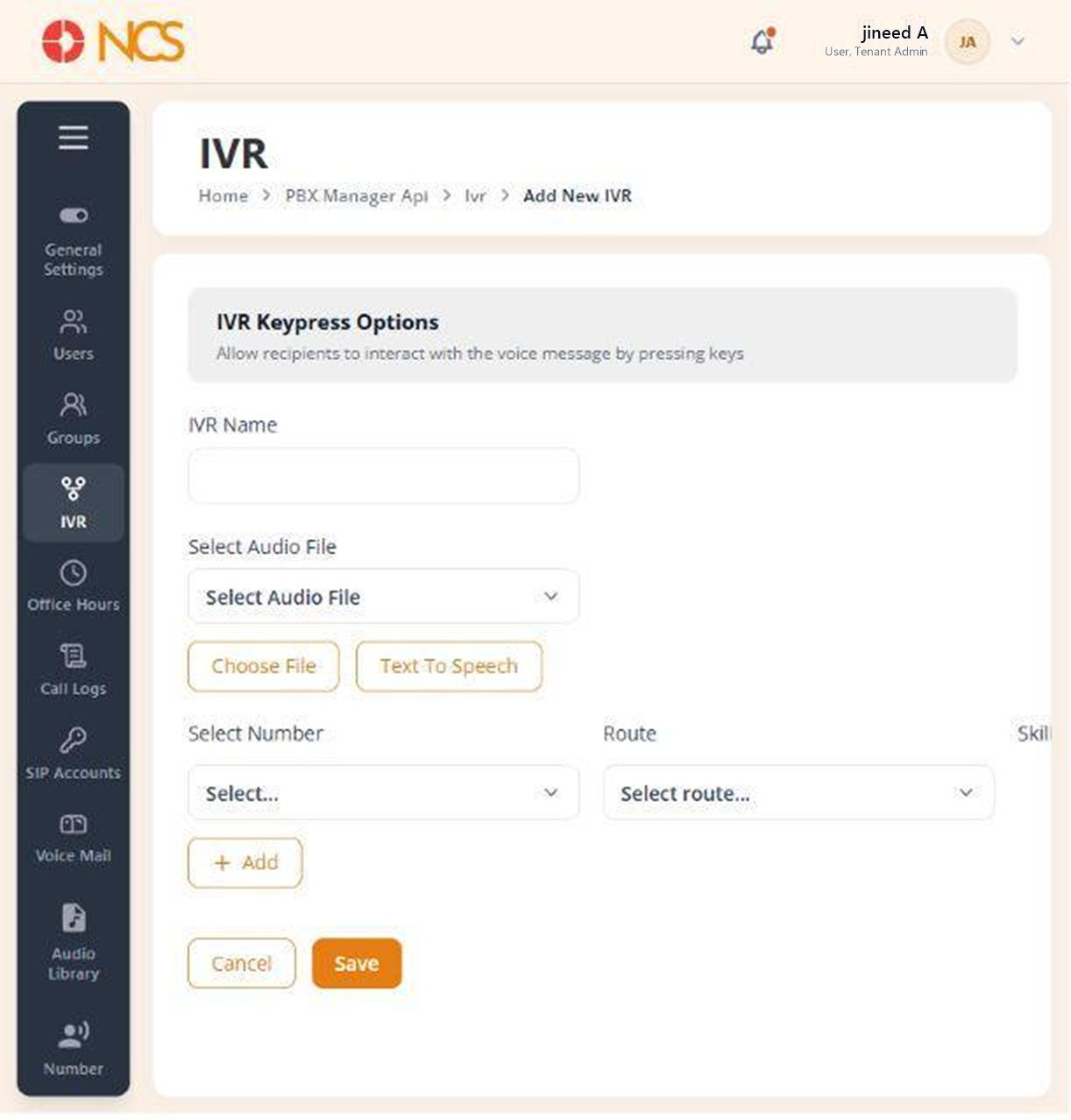
- Open مدير المقسم الآلي > الرد الصوتي التفاعلي.
- حدد Add New الرد الصوتي التفاعلي.
- أدخل الرد الصوتي التفاعلي الاسم.
- اختر the greeting the caller hears, using one of three routes:
- حدد an existing Audio File from the audio library (see المقسم الآلي 9.1).
- حدد اختر File to upload an audio file now.
- حدد Text To Speech to have the platform speak text you type.
- For each keypress row, set:
- الأرقام, the digit the caller presses.
- Route, where that digit sends the call.
- المهارات, the skill required of the agent who takes it (see SUP 5).
- حدد Add to insert another keypress row. حدد Remove Row to delete one.
- Use the drag control to reorder rows.
- حدد Save, or إلغاء to discard.
The Route dropdown is grouped, and the groups tell you what an الرد الصوتي التفاعلي can reach:
| Group | Contains |
|---|---|
| USERS | Individual tenant users. |
| GROUPS | المقسم الآلي groups (see المقسم الآلي 3). |
| AI AGENTS | The AI agents configured in المستأجر > وكيل الذكاء الاصطناعي. |
An الرد الصوتي التفاعلي keypress can hand the caller to an AI agent. The AI AGENTS group lists the agents from المستأجر > وكيل الذكاء الاصطناعي, so "press 3 to describe your problem" can route into a conversational agent rather than a person. This is the one place the two modules connect, and neither chapter mentions the other. Build the agent first, then point the keypress at it.
Build the destinations before the menu. Every Route value is a user, group or AI agent that must already exist. Create the group (المقسم الآلي 3.3), the AI agent and the skills (SUP 5.2) first, then build the الرد الصوتي التفاعلي that points at them, or you will be reopening this form for every option.
Record the menu you built. Keep the digit-to-destination map outside the product, in your own runbook. It is the first thing anyone needs when a caller reports reaching the wrong department, and reading it back off this form one row at a time is slow.
Figure key, Add New الرد الصوتي التفاعلي form
- عنوان النموذج, Add New الرد الصوتي التفاعلي.
- الرد الصوتي التفاعلي الاسم field.
- Audio File selector.
- اختر File upload control.
- Text To Speech option.
- Keypress rows, each with الأرقام, Route and المهارات.
- Drag control on each row.
- Remove Row control.
- Add control, inserts another keypress row.
- إلغاء button.
- **زر حفظ.