SUP 4.1 Review call scripts
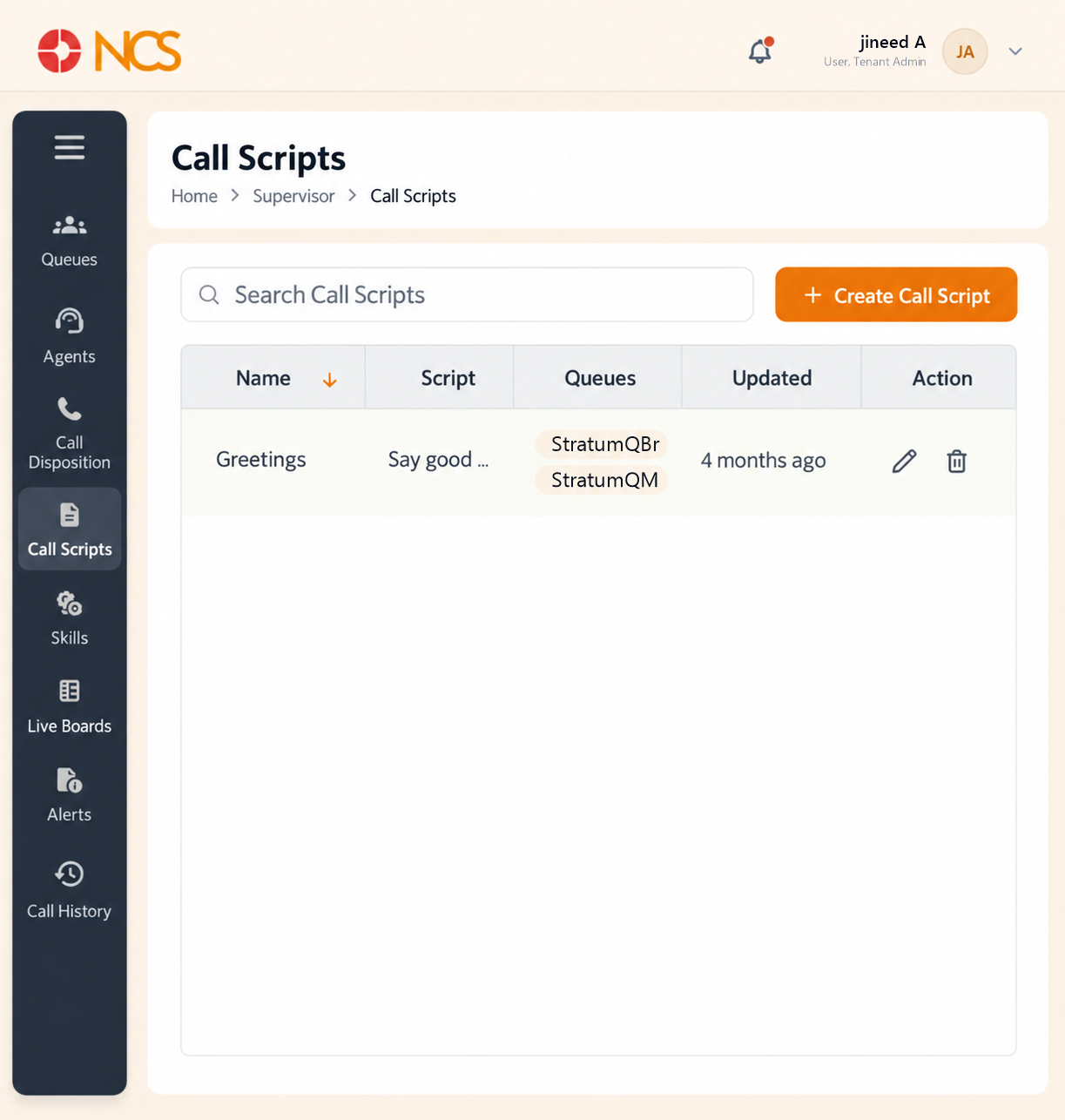
- Open المشرف > المكالمات Scripts.
- Review the columns الاسم, Script, طوابير الانتظار, Updated and الإجراء.
- Use the row actions only on the script you intend.
| العمود | المحتويات |
|---|---|
| الاسم | The script's name. |
| Script | The opening of the script text, truncated in the list. |
| طوابير الانتظار | The queues the script is assigned to, listed one per line. One script can serve several queues. |
| Updated | A relative age, for example 4 months ago, rather than a date. |
| الإجراء | Row controls. |
Read the Updated column before a coaching conversation. An agent following a script that was rewritten last week is a training gap, not a performance problem. Note that the column gives a relative age only, so for anything that turns on exactly when the wording changed, open the script rather than trusting "4 months ago".
Figure key, المكالمات Scripts
- مسار التصفح.
- Left navigation, with المكالمات Scripts selected.
- بحث المكالمات Scripts field.
- Create المكالمات Script button.
- الاسم column.
- Script column.
- طوابير الانتظار column.
- Updated column.
- الإجراء column.