PBX 1.1 Configure call settings on the General tab
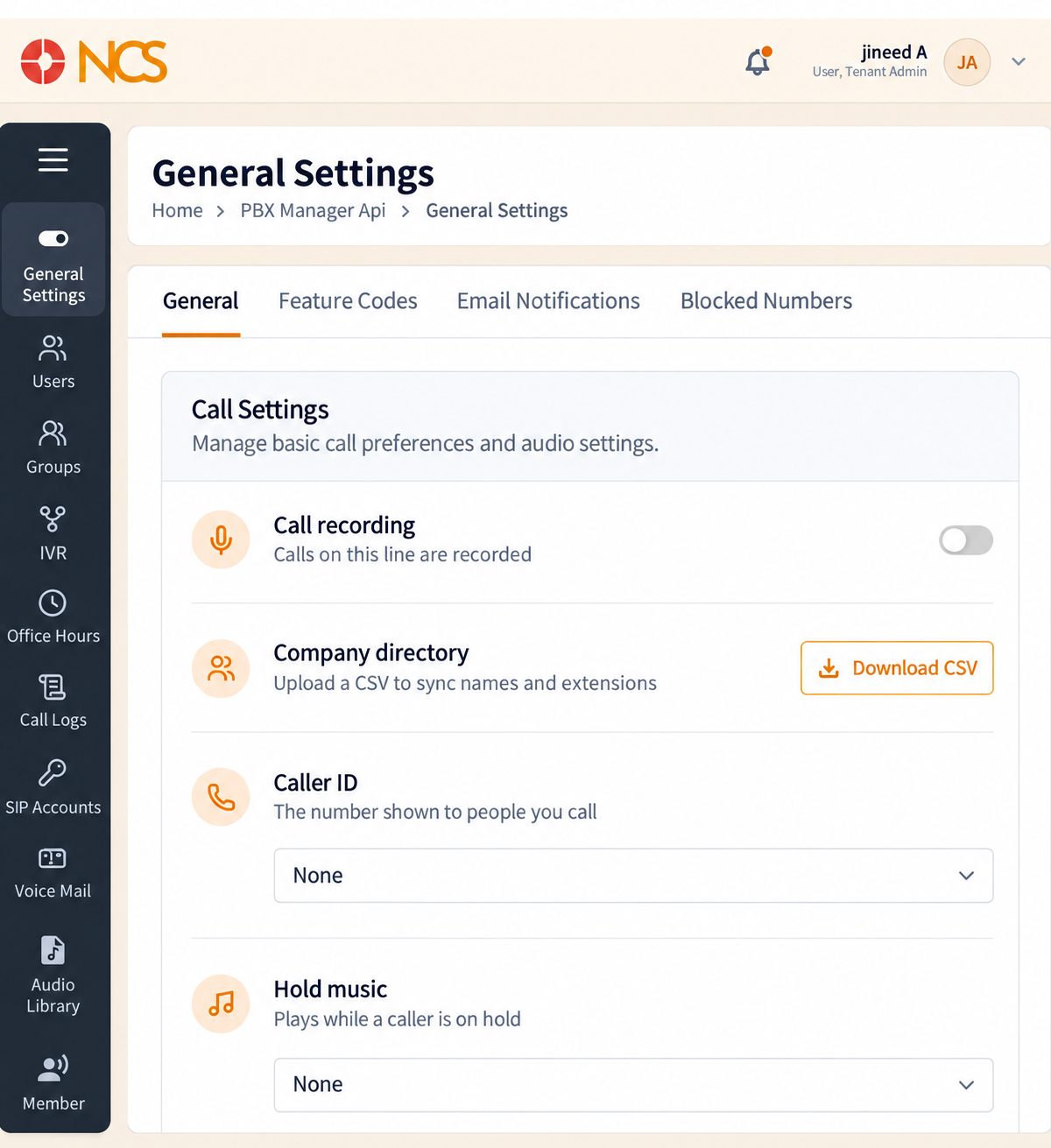
The General tab is labelled Call Settings on the page. It carries four settings and the page's save controls.
- Open PBX Manager > General Settings.
- Confirm the General tab is selected.
- Set Call recording - The toggle controls whether calls on the line are recorded.
- Set Caller ID - This is the number presented to called parties. The field defaults to None.
- Set Hold music - This is the audio played to a caller placed on hold. The field defaults to None. Select Upload beside it to add an audio file.
- Select Save Changes to apply the settings, or Cancel to discard them.
Both Caller ID and Hold music arrive set to None. Neither is populated for you when a tenant is created. A tenant that has never visited this page presents no chosen caller ID and plays no hold music, so set both before you put the system in front of customers.
Figure key, General Settings, General tab
- Breadcrumb.
- Left navigation, ten items, with General Settings selected.
- General tab, selected.
- Feature Codes tab.
- Email Notifications tab.
- Blocked Numbers tab.
- Call recording toggle.
- Company directory section, with its helper text and Download CSV control.
- Caller ID selector, defaulting to None.
- Hold music selector, defaulting to None, with its inline Upload control.
- Cancel button.
- Save Changes button.