3.4.4 Stage 4, Intent and Routing
This stage decides what the agent handles itself and where it sends callers it cannot help. It replaces a press-one, press-two SVI (SVI (IVR)) menu with conversational routing: callers say what they need in their own words and the agent routes them.
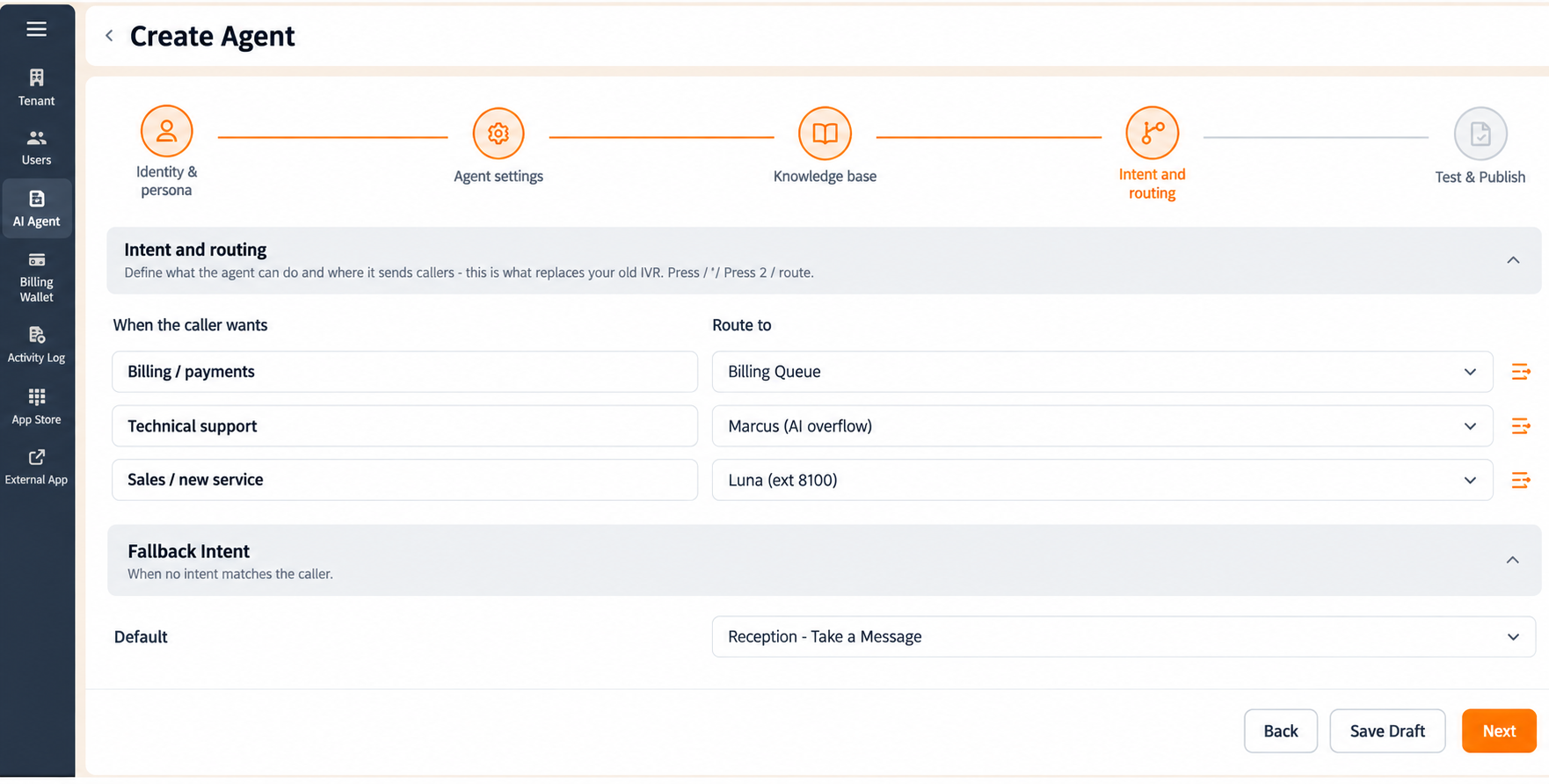
When the Appeler Wants. The left column lists the caller intents the agent recognises, each one a common reason a caller gets in touch, for example:
- Billing / payments, queries about invoices, charges or payments.
- Technical support, queries about technical problems or troubleshooting.
- Sales / new service, queries about buying or upgrading services.
Each intent is a fixed label. Intents cannot be renamed or added from this screen.
Route To. For each intent, use the Route to dropdown in the right column to choose where matching calls go. Destinations include:
- Billing Queue, the billing department's call queue.
- Support Queue, the technical support queue.
- Sales Team, the sales team.
- A named AI overflow agent, a second AI agent that absorbs overflow volume.
- A named extension, routing the caller straight to one person.
- Reception - Take a Message, reception, where a message is taken.
The destinations offered are the queues, agents and extensions configured on your own tenant, so your list differs from the examples above. Sélectionnez a destination to assign it; the current selection is marked with a checkmark. You can point several intents at the same destination, or give each intent its own.
Fallback Intent. The Fallback Intent section decides what happens when a caller's request matches none of the intents above.
- Par défaut, the destination the agent routes to in that case, for example Reception - Take a Message. Set this. It is the safety net that stops an unrecognised request from being dropped.
Sélectionnez the chevron icon at the top right of the Fallback Intent panel to collapse the panel to its header, hiding the Par défaut field. Sélectionnez it again to expand the panel.
Navigation:
- Retour returns to Knowledge Base.
- Next completes this stage and unlocks Test and Publish.
- **Enregistrer le brouillon sauvegarde votre progression sans terminer la configuration.
- The back arrow (
<) at the top left exits the wizard and returns you to the Agent IA list.
Figure key, Stage 4
- Progress bar, with Intent and Routing active.
- Retour arrow (
<), top left. - When the Appeler Wants column heading.
- Intent labels, fixed, one per row.
- Route to dropdown, one per intent row, with the checkmark on the current selection.
- Fallback Intent panel heading.
- Chevron icon, collapses and expands the Fallback Intent panel.
- Par défaut destination dropdown.
- Retour button.
- **Bouton Enregistrer le brouillon.
- **Bouton Suivant.