7.1 Review existing connections
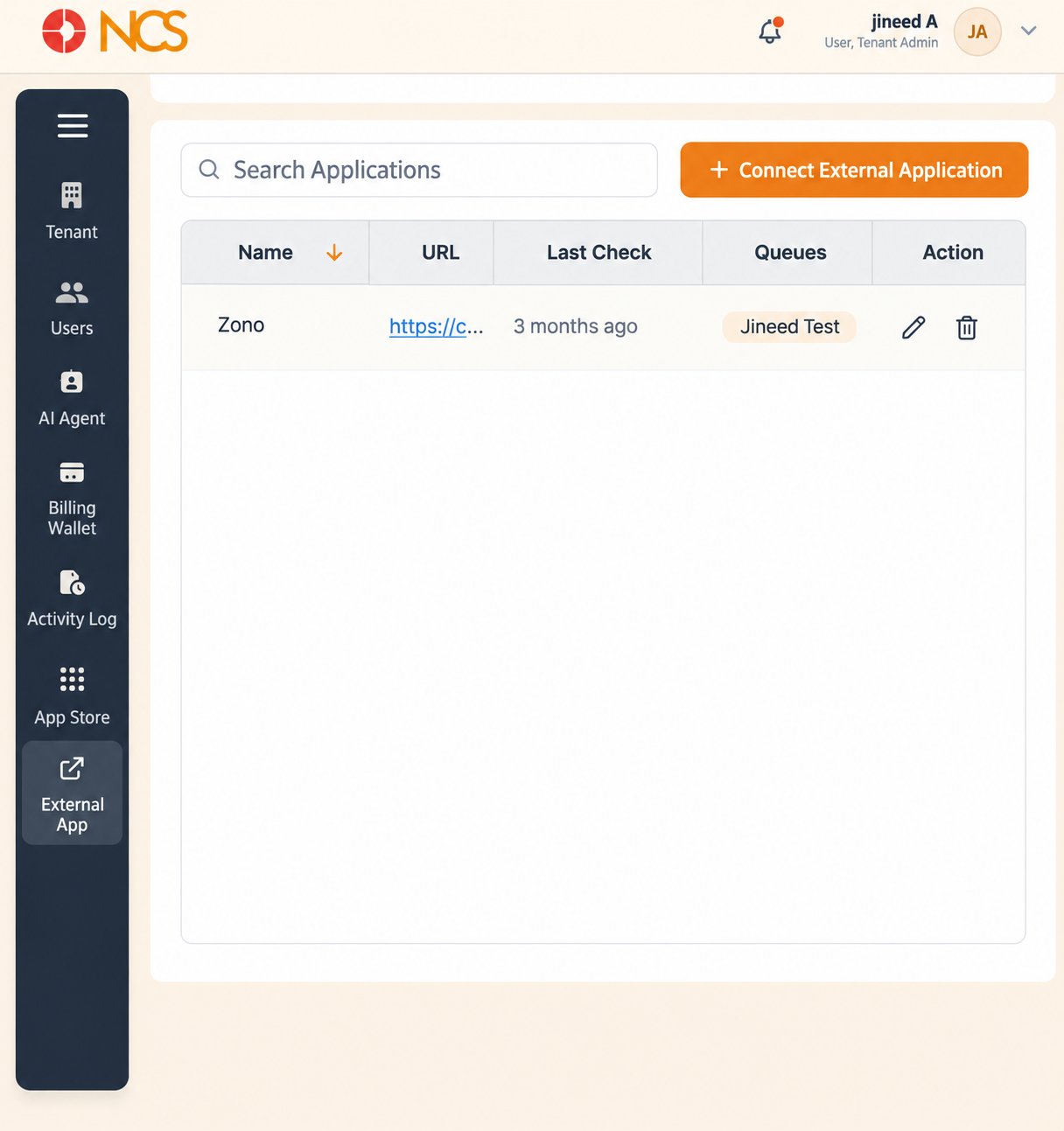
Locataire > Application externe connects call events on your tenant to a URL on an external system. Each connection is a webhook: when the chosen event occurs, the platform calls your URL, and call data can be passed in the URL itself as variables. This is how you make a CRM open the right customer record when a call comes in.
- Open Locataire > Application externe.
- Use Rechercher Applications to locate a connection.
- Use Sort by Nom to order the list alphabetically.
Columns:
| Colonne | Contenu |
|---|---|
| Nom | The descriptive name given to the connection. |
| URL | The destination the platform calls, including any variables in it. |
| Last Check | When the connection was last exercised. Read this first when an integration appears to have stopped: a stale Last Check points at the connection, a current one points at the receiving system. |
| Fichiers d'attente | The queues associated with the connection. |
| Action | Row controls for the connection. |
Confirmer you have the right connection before using any row control. Two connections to the same system with different events look almost identical in this list.
Figure key, Application externelications list
- Fil d'Ariane.
- Left navigation, with Application externe selected.
- Rechercher Applications field.
- Sort by Nom control.
- Connect Application externelication button.
- Nom column.
- URL column.
- Last Check column.
- Fichiers d'attente column.
- **Colonne Action.